GraphQL
This functionality is available on Tweak Basic and Tweak Max. Compare the plans here.
Every GraphQL query and mutation goes to the same URL, usually /graphql, so a URL alone cannot tell one operation from another. Tweak gives you two ways to mock one operation at a time:
- Match by operation name (Tweak Basic) - a rule matches
/graphqlplus a body that contains"operationName": "getMovie", with payload matching. No code. - Response hook (Tweak Max) - write your own logic over the request body, branching on the operation name and/or the variables.
We cover both techniques below, but first, a small refresh on GraphQL queries - skip this part if you are very comfortable with GraphQL.
GraphQL refresher
Let's use this prisma-labs/graphql-request query example to fetch a movie's details.
import { GraphQLClient } from 'graphql-request';

const client = new GraphQLClient(endpoint);
const query = gql`
  query getMovie($title: String!) {
    Movie(title: $title) {
      title
      releaseDate
      actors {
        name
      }
    }
  }
`;
const variables = { title: 'Inception' };

const data = await client.request(query, variables);
There are two pieces of information convenient to intercept and mock this GraphQL query:
- The
variables- sent in the request payload (i.e. thePOSTrequest body). - Operation name
getMovie- the propertyoperationNameholds the stringgetMovie, giving a meaning to the query. We can leverage this property to easily branch our interception logic.
Inspecting the devtools, you might find a similar object under the Request payload tab:
{
  "query": "... the raw query ...",
  "variables": {
    "title": "Inception"
  },
  "operationName": "getMovie"
}
👆 We can leverage this data to configure amazing tweak rules ✨.
Configuring tweak
Here are the recommended ways to intercept and mock GraphQL API calls. We use the above example in our demonstrations.
Match by operation name (no code)
Use payload matching in Contains mode: tweak compares the JSON you write on the Request payload tab against the request's body, and if your small piece of JSON is a subset of the body, tweak intercepts the request. One rule per operation, all on the same URL:
- Set the URL to your GraphQL endpoint, e.g.
/graphql. - Select
POSTas the HTTP method (or use the wildcard option). - On the
Request payloadtab, pick Contains in the bar above the editor and write{ "operationName": "getMovie" }. Add"variables"too if you only want, say, theInceptionquery.
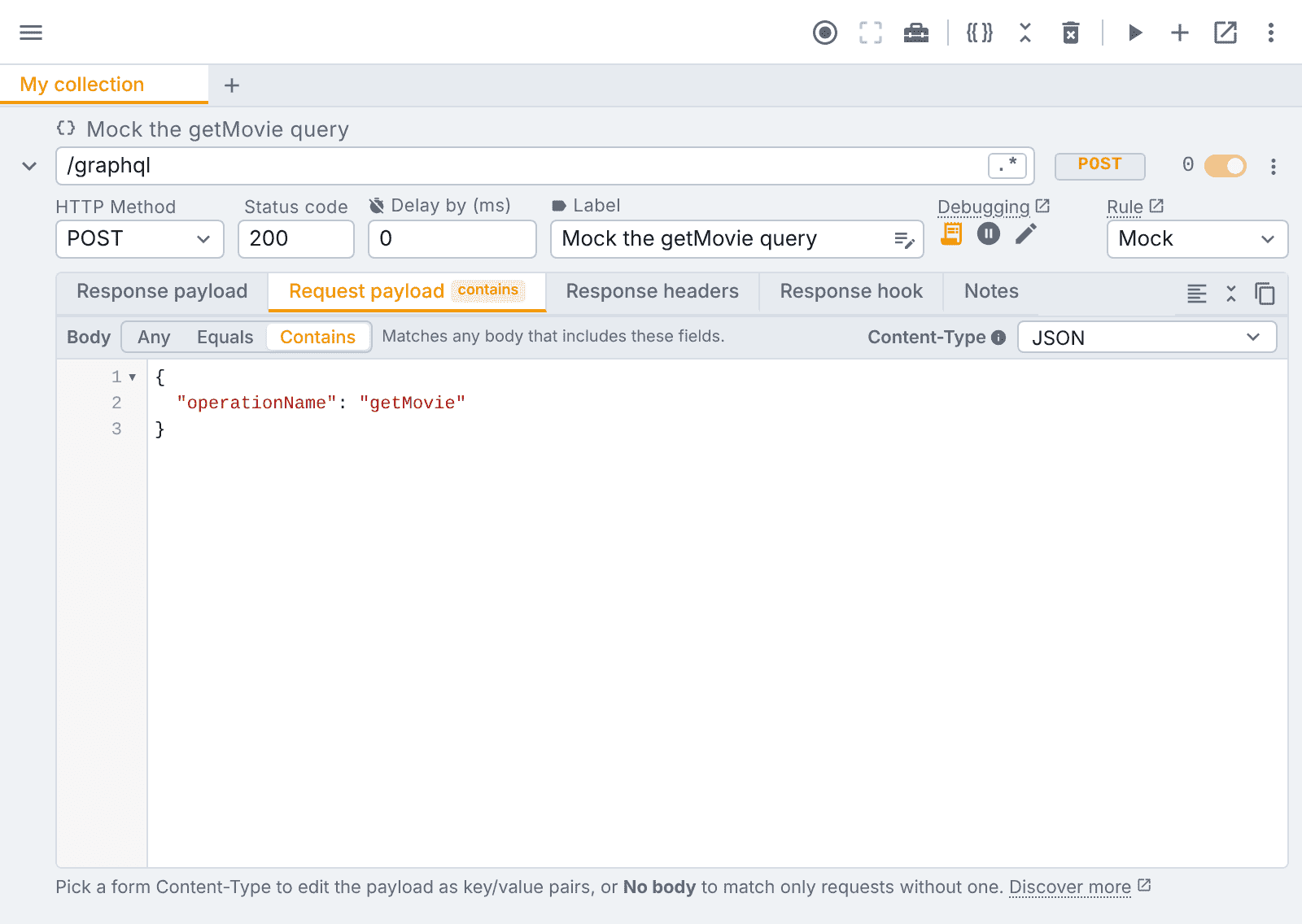
Equals would only catch a body exactly equal to what you wrote, which a real GraphQL client never sends, so Contains is the mode you want here.
Full control with JavaScript
In case you need more flexibility to intercept a GraphQL query/mutation, you can write your own interception and mocking logic under the Response hook tab. Here's how to configure it:
- Set up the URL and HTTP method as in the example above.
- Empty the
Response payloadeditor. - Pick Any on the
Request payloadtab, so every request on the URL reaches your script. - Write the following code in the
Response hookeditor.
// 💡 tweak makes the request body globally available in your script
const bodyObj = JSON.parse(body);

if (bodyObj.operationName === 'getMovie' && bodyObj.variables.title === 'Inception') {
  // 💡 forward your response mock
  return {
    data: {
      title: 'Inception',
      releaseDate: '2010-07-22',
      actors: [
        { name: 'Leonardo DiCaprio' },
        { name: 'Joseph Gordon-Levitt' },
      ],
    },
  };
}

// 💡 forward other responses that you are not targeting for interception
return response;
Once more, for this JavaScript to kick in, the Request payload tab must be on Any and the Response payload editor empty, so that all requests go through your script, no matter their request payloads, and so that you don't override the output of your script with mock data (Response payload takes precedence over Response hook outputs).
One ring rule to rule them all, surgical modifications
The previous script targets a single query, but you can broaden the scope of your logic as you wish, it's just JavaScript!
Because most of the time you will work with existing GraphQL APIs deployed across different environments, one powerful technique is to use a Modify rule to modify portions of the incoming server response. Instead of fully mocking the response you can modify particular values of the incoming server response payload.
Here's an example that appends the string | Popcorn to the movie title property, while keeping the rest of the data intact.
const bodyObj = JSON.parse(body);

switch (bodyObj.operationName) {
  case 'getMovie':
    return {
      // 💡 surgical modification of "title"
      data: {
        ...response.data,
        title: `${response.data.title} | Popcorn`,
      },
    };
  case 'getActor':
    return { ...response /* ... */ };
}

// 💡 forward other responses that you are not targeting for interception
return response;
Don't worry about errors, we got you covered, if your script breaks we catch the error for you and log it in the devtools console.
Need something else? Request a feature